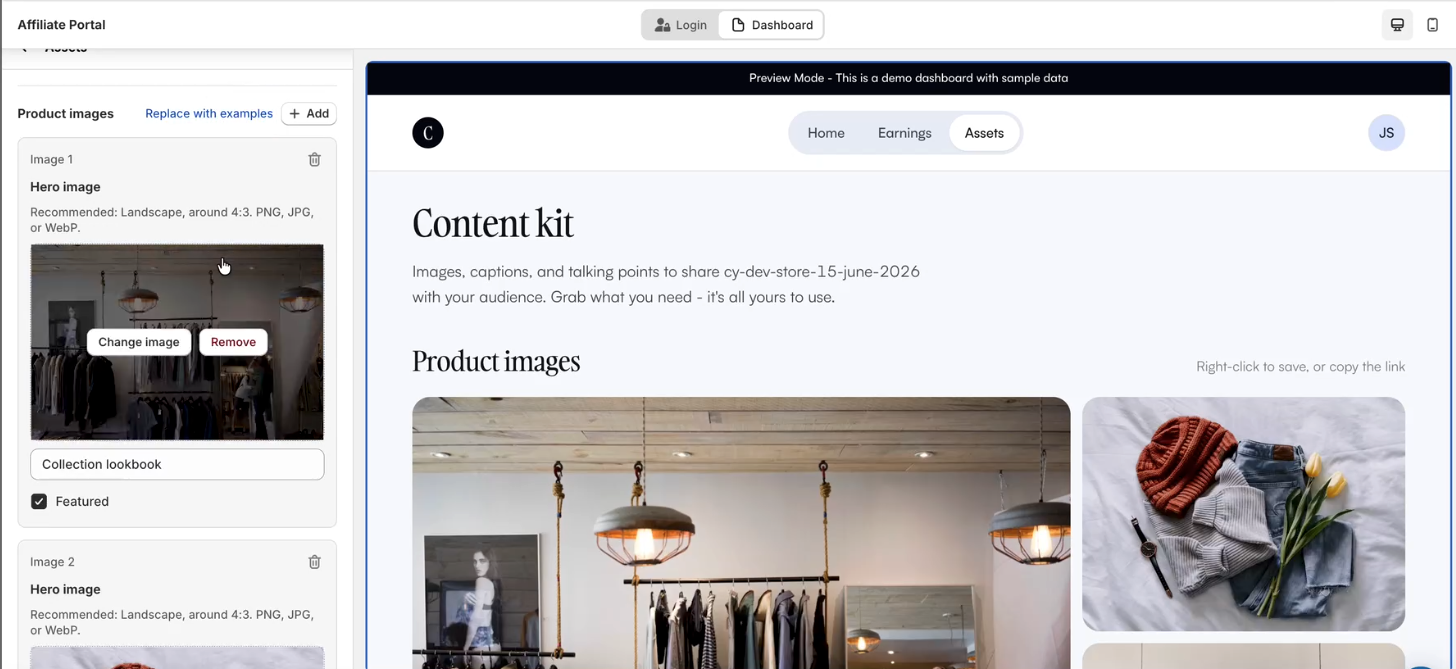
Merchants with affiliate campaigns can now provide affiliates with ready-to-share marketing assets directly within the Affiliate Portal.
Ready-to-Share Content — Publish branded images, captions, and talking points for affiliates to use in their promotions
Draft & Preview — Build and preview assets in the Theme Editor before making them live
One-Click Publishing — Enable the Show Assets Page toggle to instantly publish assets to affiliates
This update is available to merchants running affiliate campaigns.
New Join Block v2 for Shopify Themes
Shopify merchants can now use the new Join Block v2, replacing the legacy Join Blocks 1–4 with a more flexible, customizable, and performant experience.
Campaign Selection — Choose the campaign directly within the block instead of assigning it to one of four fixed legacy blocks
4 Built-in Layouts — Select from Stacked, Card, Hero, or Inline Strip to match your storefront design
More Customization — Configure content and styling for every advocate state, including pre-signup, post-signup, share, unenrolled, and waitlist
Better Performance — Built as a native Shopify Theme App Extension for faster loading and minimal impact on storefront performance
Backward Compatible — Existing Join Blocks 1–4 continue to work as-is but are now deprecated and will no longer receive updates
This update is available to Shopify merchants using Online Store 2.0 themes. (Vintage and some custom themes do not support Theme App Blocks.)
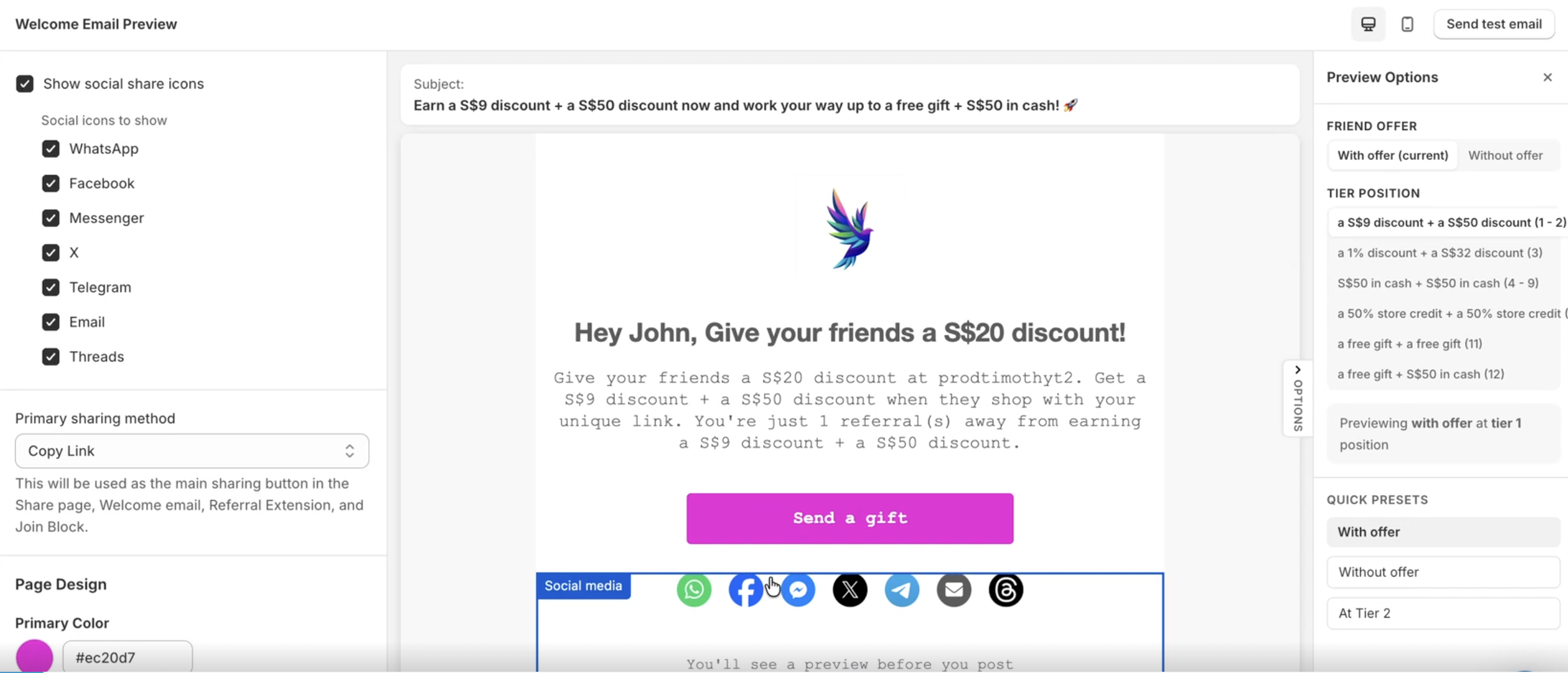
Custom Social Icons for Marketing Emails
Merchants can now choose which social media icons to display in their marketing emails sent to advocates and affiliates.
Per-Email Configuration — Select specific social icons for each marketing email individually
Supported Email Types — Available across Welcome, Reminder, Winback, Referral Progress, Reward Pending, and Reward Successful emails
More Brand Control — Display only the social channels that are most relevant to your brand and audience
Merchants can now customize the social media icons shown in their advocate and affiliate marketing emails on an email-by-email basis.
Shipping Address Display for Shopify Self Referrals
Shopify merchants can now view the shipping address associated with self-referral orders directly within the Self Referrals page.
Shipping Address Visibility — Displays the order's shipping address to help merchants review potential self-referrals more quickly
Faster Fraud Review — Makes it easier to compare shipping details when investigating suspicious referrals
Privacy Focused — Shipping addresses are retrieved from Shopify and displayed for review only; they are not stored by ReferralCandy
Shipping addresses are now displayed for Shopify self-referrals, helping merchants investigate suspicious referrals more efficiently without storing customer address data.
Hide Social Icons in Marketing Emails
Merchants can now choose whether to display social sharing icons in their marketing emails sent to advocates and affiliates.
Show or Hide Social Icons — Control whether social sharing icons appear in each marketing email
Supported Email Types — Available for Welcome, Reminder, Winback, Referral Progress, Reward Pending, and Reward Successful emails
Welcome Email Update — If a different primary sharing method was previously selected, it will automatically switch to Copy Link when social icons are hidden
Merchants can now hide social sharing icons from advocate and affiliate marketing emails, with the Welcome email automatically using Copy Link as the primary sharing method when needed.
Advocate Portal Now Default for New Merchants
New ReferralCandy merchants now have the Advocate Portal enabled by default, replacing the separate Share and Rewards pages previously used by advocates.
Single Column — Combines sharing and rewards into one streamlined advocate experience
Faster Sharing — Referral links and invite codes are available directly on the login screen for quicker access
Reward-Focused Experience — Highlights multiple reward types, including coupons, cash, and store credits, in a unified dashboard
The Advocate Portal is now the default experience for new merchants, replacing separate Share and Rewards pages with a faster, unified dashboard.
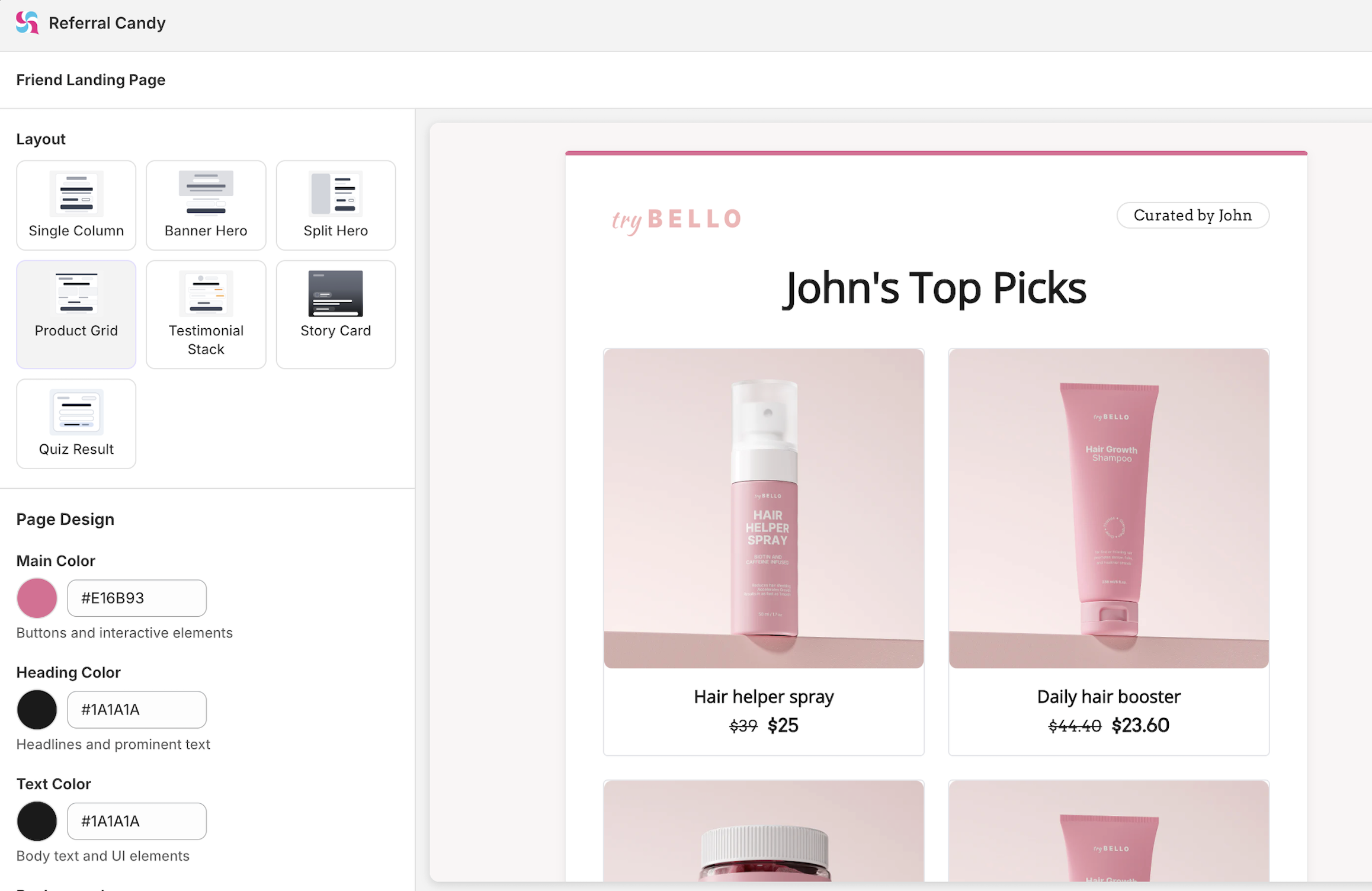
New Layouts for Friend Offer Landing Page
Merchants now have 7 new layouts for the Friend Offer Landing Page (FOLP). These new layouts are designed to support different merchandising and storytelling styles:
Single Column — Simple, focused layout that presents the referral offer in a single vertical flow, ideal for minimal and distraction-free experiences
Banner Hero — Top-banner-led layout that highlights the offer with a strong visual header, great for grabbing attention quickly
Split Hero — Two-column layout that pairs visuals with offer details side-by-side, perfect for balancing imagery and messaging
Product Grid — Clean card-based layout that showcases the referral offer alongside a product grid, ideal for highlighting your catalog
Testimonial Stack — Social-proof-focused layout that pairs the referral offer with customer testimonials to build trust
Quiz Result — Interactive-style layout that presents the offer as a personalized result, great for quiz-driven funnels
Story Card — Full-screen, mobile-first layout inspired by social media stories, with background images and gradient overlays
All layouts are fully customizable via the theme editor (including colors, fonts, text, and images), support both enrolled and unenrolled states, and are optimized for both desktop and mobile devices.
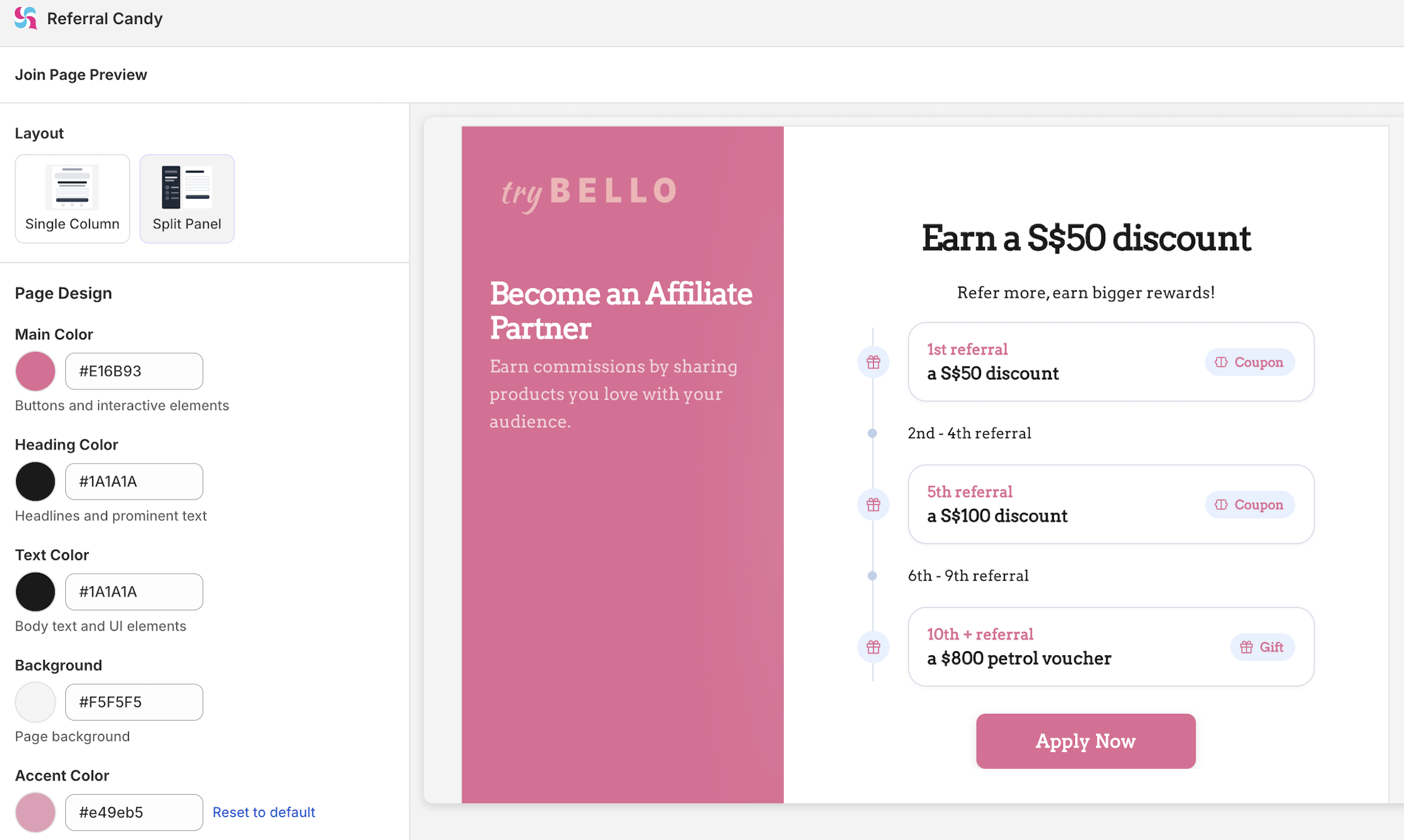
New Split Panel Layout for Join Page
Merchants now have a new split panel layout option for the Join Page, giving more flexibility in how they design the signup experience.
New split panel layout added as an alternative to the existing Join Page design
Supports building multi-step forms for a more guided signup flow
New Theme Editor for Referral & Affiliate Campaigns
Merchants now have a redesigned theme editor that consolidates all branding controls in one place. Each page (Offer Landing, Rewards, Join, Sharing, etc.) is shown as a clickable card with its own editor replacing the old single-unit theme structure.
5 color controls (Brand, Heading, Text, Background, Card) and 2 separate fonts (Heading, Body)
Click-to-edit text directly in the live preview - no separate Content tab
Preview Options panel to simulate different states: paused campaign, enrolled vs unenrolled advocate, with or without a friend offer
Desktop and mobile device preview before publishing
Favicon upload support (32×32px)
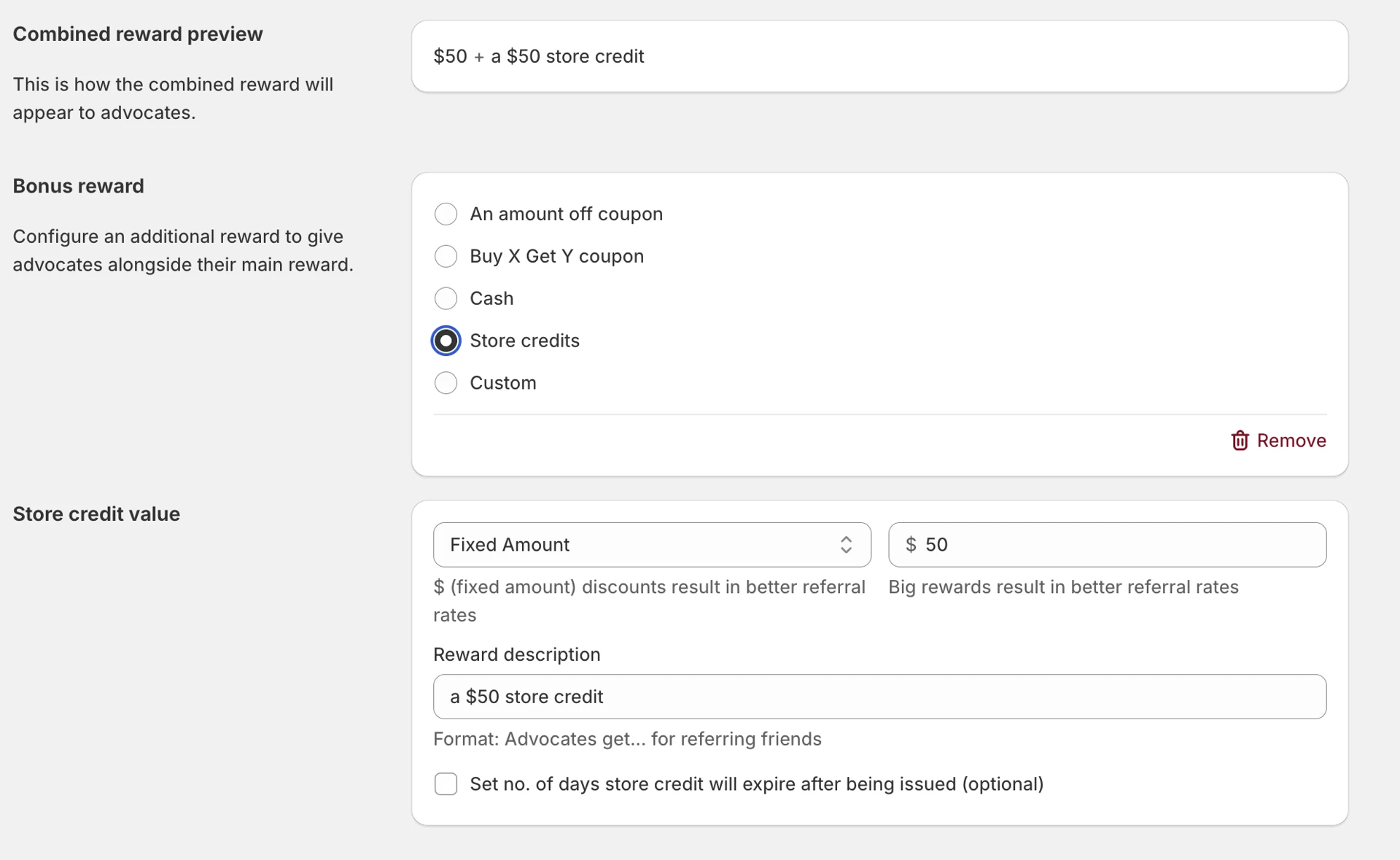
Bonus rewards for Shopify merchants
Merchants can now add a bonus advocate reward on top of their existing reward for each tier mixing and matching different reward types.
Combine different types: e.g. 15% coupon + $20 store credit
Combine same types: e.g. $50 cash + $20 cash
Applies to both referral and affiliate campaigns
Multi-currency payouts for Tremendous and Manual CSV
Shopify merchants using Tremendous or Manual CSV cash payouts can now select from 20 payout currencies, including EUR, GBP, CAD, AUD, and SGD.
This allows affiliates/advocate to receive payouts in another currency.
This affects all shopify merchants using Tremendous and Manual CSV cash payouts.
Enable privacy-protected referral links that hide advocate identities
New advocates/affiliates get random usernames, and all advocates/affiliates can generate anonymous links in one click. Existing advocates can also easily randomize their username in the portal. Opt in.
Advocates/affiliates who share links publicly, on social media, forums, communities, often hesitate because referral links expose their name.
This feature removes that barrier. More comfortable advocates means more sharing.