Launch with drag-and-drop app blocks
Add ReferralCandy from the Apps panel in Shopify’s visual editors, choose the page or checkout location, and move each block into place without editing theme code.


Commerce platform integration
ReferralCandy gives you Shopify-native app blocks, app embeds, and checkout extensions that live inside the store experience you already manage. Drag and drop referral touchpoints into Shopify’s visual editors, then let ReferralCandy recognize referred purchases and move every participant from invitation to reward.
Not on Shopify? Try ReferralCandy for free.
Drag-and-drop Shopify app blocks with no theme-code project required.

Why connect Shopify
These are not off-theme widgets bolted onto your storefront. ReferralCandy uses Shopify-native app blocks and extensions so your team can place the referral journey in the Theme editor and Checkout editor: invite advocates on a storefront page, deliver a friend offer over the store, and ask for the next referral immediately after purchase.
Add ReferralCandy from the Apps panel in Shopify’s visual editors, choose the page or checkout location, and move each block into place without editing theme code.
Use a Join Block on an Online Store page, a Friend Offer Popup app embed on the storefront, and a Referral Extension app block on the post-purchase Thank You page.
ReferralCandy detects purchases attributed to personal referral links, applies your eligibility rules and review period, then delivers the reward you configured.
Shopify-native touchpoints
ReferralCandy surfaces live where your team already builds the customer experience. Add and position them through Shopify’s visual editors, connect each surface to the right campaign, and preview the experience before it goes live.
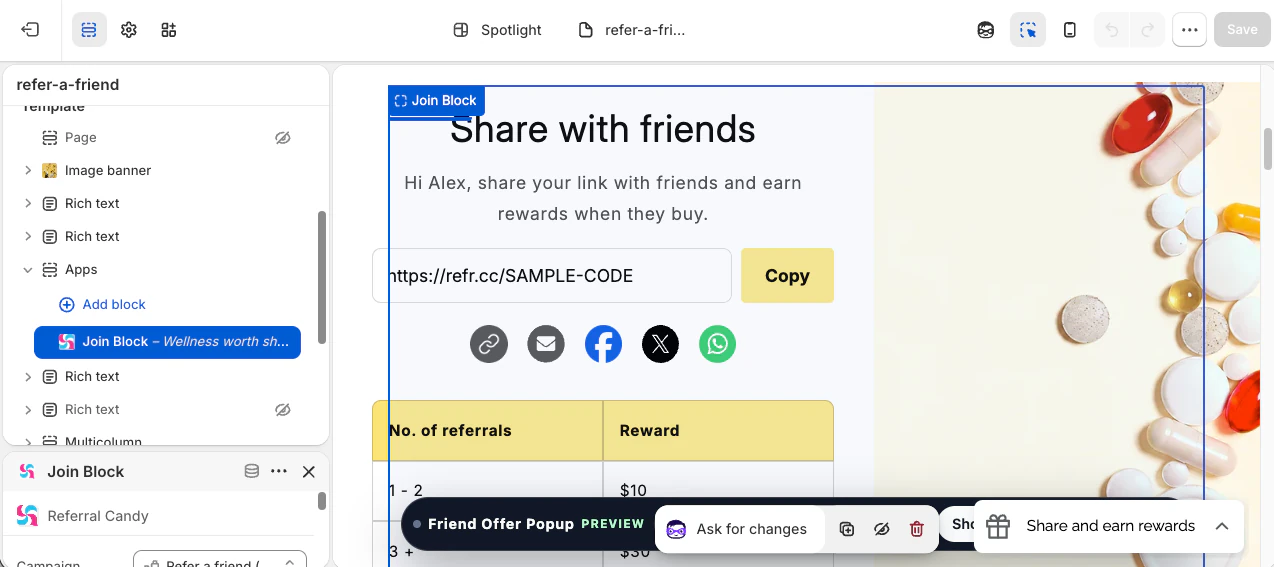
Online Store app block
Add the ReferralCandy Join Block to any Online Store 2.0 page from the Shopify Theme editor. Use it as a native signup and sharing hub on a dedicated refer-a-friend page, then drag it into the right section alongside the rest of your theme content.
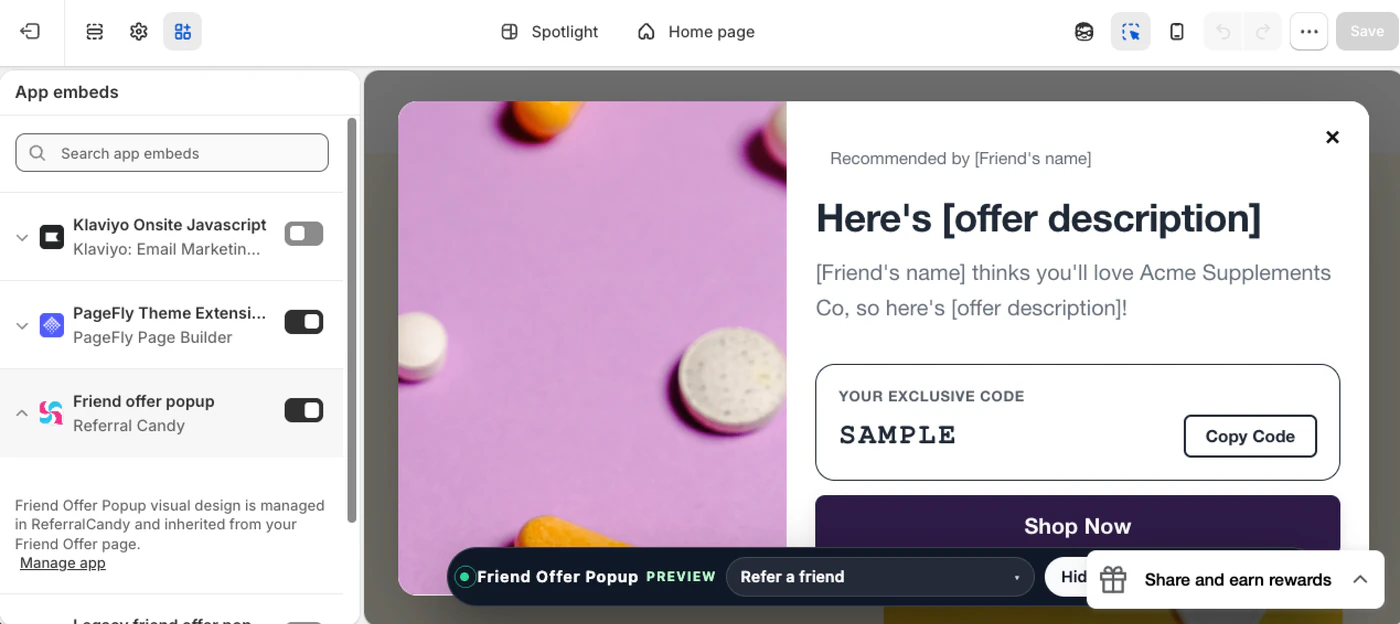
Theme app embed
Enable the Friend Offer Popup from Shopify’s App embeds panel. A referred friend can land directly on your storefront and receive the offer in a branded popup, keeping the transition from recommendation to shopping inside the store experience.
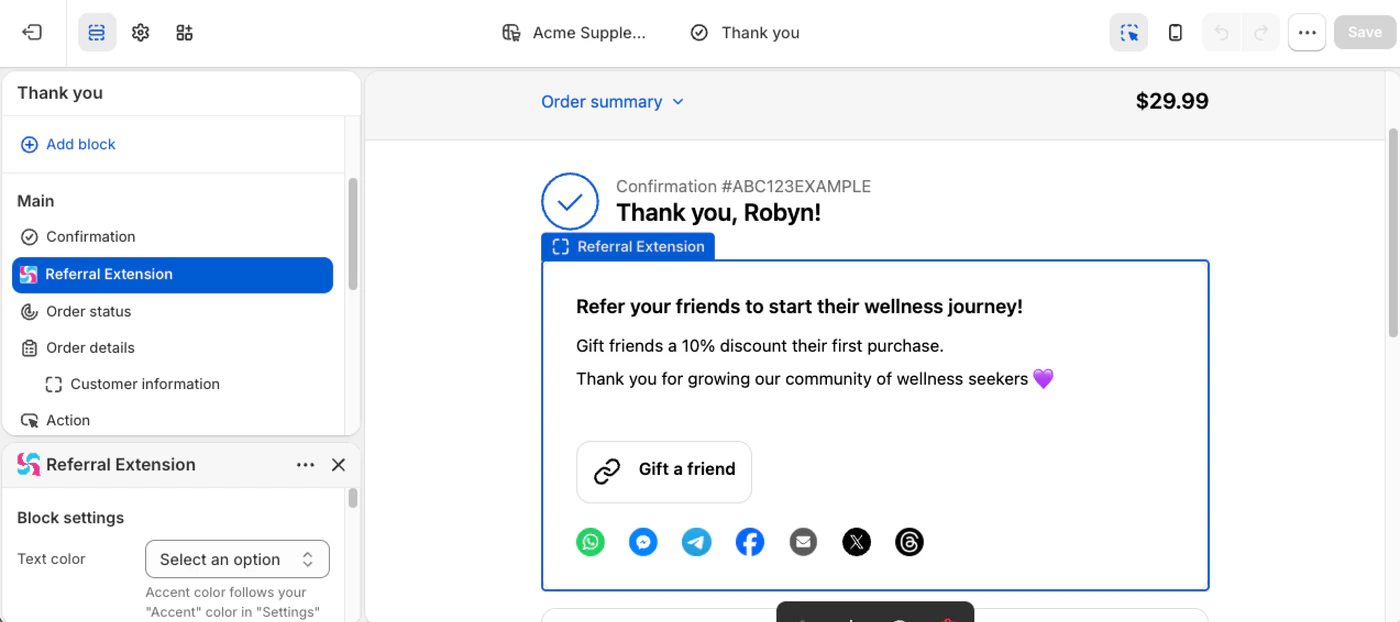
Checkout app block
Add the Referral Extension app block in Shopify’s Checkout editor and place it on the post-purchase Thank You page. Customers can see their referral link and sharing options inline, at the moment their enthusiasm for the purchase is highest.
See it in your stack
Start with the integration you already run, then shape the campaign, reward, and message around the relationships your brand has earned.
Not on Shopify? Try ReferralCandy for free.
How it works
The integration follows the customer journey your store already has. ReferralCandy adds the referral layer around it.
Add ReferralCandy to your store and open it from Apps in Shopify admin. Your store connection is established as part of the app installation.
Choose a referral or affiliate campaign, define who can participate, and set the advocate reward and friend offer that fit your margin.
Use Shopify’s Theme editor and Checkout editor to add the Join Block, Friend Offer Popup app embed, and Referral Extension wherever each touchpoint fits the customer journey.
When a referred friend buys, ReferralCandy records the purchase, checks the campaign rules, and moves eligible rewards through your chosen delivery flow.
In production

A referral program worked so well for MiaoMiao's Smart Readers that they added an affiliate program for their second product. Here's how they used ReferralCandy to make lives better around the world.
Read the case study →
How Riff Raff & Co used ReferralCandy to drive six-digit sales, and bring smiles (and sleep!) to parents and babies around the world. Here’s how they did it with word-of-Mum!
Read the case study →
In the first 30 days, ReferralCandy contributed 13% of all revenue to iWader Fishing, SainStore's customer.
Read the case study →Built for the operating team
A referral strategy changes as your customer base and product mix change. The Shopify integration gives the growth team room to test the parts that matter without rebuilding the underlying connection.
Enroll eligible customers automatically, bring past customers into a segment, or let people join from a campaign page or storefront block.
Place app blocks alongside your theme content, inherit the store’s styling where supported, and preview storefront and post-purchase touchpoints before publishing.
Use Test Mode to walk through the advocate and friend journey, then activate the campaign when the offer and experience are ready.
Who it is for
Use this integration when referrals and affiliates need to become a repeatable part of your Shopify growth stack, not a one-off landing page or spreadsheet process.
Questions, answered
Marketing overview first. When you are ready to configure the integration, the technical guide has the exact settings.
No. Install ReferralCandy, then add and position its app blocks through Shopify’s Theme editor or Checkout editor. The Join Block, Friend Offer Popup app embed, and Referral Extension do not require a theme-code implementation.
You can place the Join Block on an Online Store 2.0 page, enable the Friend Offer Popup as a theme app embed, and add the Referral Extension as an app block on Shopify’s post-purchase Thank You page. ReferralCandy also supports a customer referral details extension for customer accounts.
Yes. ReferralCandy supports multiple campaigns, and each campaign can use its own target audience, reward structure, and design.
ReferralCandy uses the Shopify connection and each advocate or affiliate’s personal link to detect and attribute referred purchases.
Yes. You can define reward conditions and use a review period so returns, cancellations, and ineligible referrals can be handled before a reward becomes due.
Yes. The Join Block inherits theme fonts and colors by default and includes layout and style controls in the Shopify Theme editor. Other ReferralCandy surfaces provide their relevant display and design settings through Shopify or ReferralCandy’s visual editors.
+Connect Shopify to ReferralCandy and make referral and affiliate growth part of the stack your team already runs.
Not on Shopify? Try ReferralCandy for free.